
Ctrl+K
atomworks  documentation - Home atomworks  documentation - Home
  • How to Build a Model with AtomWorks
  • Tutorial
  • Installation
  • Glossary
  • API
  • Examples
  • Contributing
  • Data Mirrors
  • How to Build a Model with AtomWorks
  • Tutorial
  • Installation
  • Glossary
  • API
  • Examples
  • Contributing
  • Data Mirrors

atomworks documentation#

Welcome to atomworks — a toolkit for converting, parsing, and manipulating biological structure and sequence data, inspired by the Biotite library. Quickly convert between formats, extract features, and prepare data for machine learning or structural analysis.
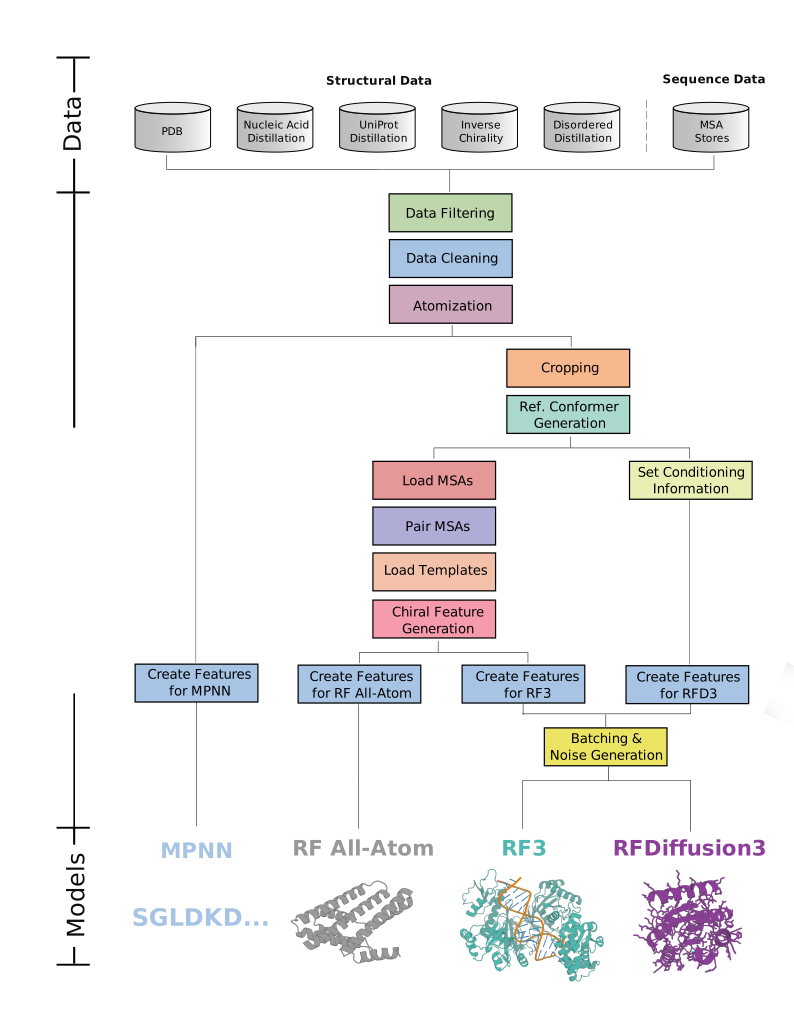
atomworks datapipelines

Building a Model with AtomWorks

  • How to Build a Model with AtomWorks
    • Part 1: Cleaning the Data
    • Part 2: Creating a Transform Pipeline
    • Part 3: Write a Model
    • Part 4: Train a Model

Navigation

  • Tutorial
    • Getting Started
  • Installation
    • 0. Prerequisites
    • 1. Installing via pip (recommended)
    • 2. Development Installation
    • 3. Running the Test Suite
    • 4. Setting Up Full PDB/CCD Mirrors
  • Glossary
    • Entities vs. Instances
    • Suffixes
    • Chains, PN_Units, and Molecules
    • Combinatorial Nomenclature - Worked Example
  • API
    • Core Modules
    • IO
    • ML
  • Examples
  • Contributing
    • As you code
    • As you commit
    • As you finalize a PR
    • As you review
    • Contributing to the documentation
    • Other Resources
  • Data Mirrors
    • Setting Up Mirrors
  • Training on the PDB
    • Step 1 — Mirror the PDB (mmCIFs)
    • Step 2 — Get PDB metadata (PN units and interfaces)
    • Step 3 — Configure an AF3-style dataset (example: train only on D-polypeptides)
    • Step 4 — Train a model

next

How to Build a Model with AtomWorks

Show Source

© Copyright 2025, bakerlab.

Created using Sphinx 8.2.3.

Built with the PyData Sphinx Theme 0.20.0.